

We often hear the same frustration from families setting up care spaces for aging parents. You invest in a medical emergency device to provide peace of mind, but that investment is useless if the device sits on a bedside table.
According to a 2026 report from The Senior List, 91 percent of adults aged 65 and older still do not use a dedicated personal emergency system. Our team has watched this exact compliance gap play out countless times across Canada.
The statistics paint a clear picture of why this matters.
Between 2017 and 2022, fall-related deaths among older Canadians increased by 51 percent. We want to help you find a reliable setup that actually gets used.
Let’s look at the actual data behind these two approaches, what they realistically demand from users, and how to choose the right fit.
For the broader three-way picture including the consumer-camera option, see the camera vs pendant vs in-home monitoring guide.
The Two Categories, Honestly
A medical-alert pendant is a small wearable device with a button that calls a monitoring centre or family member when pressed. This approach is direct, simple, and well-established. Our preferred alternative, the Kinpanion approach to privacy-first fall detection, is a passive whole-home system where a fall detection camera does its work on-device.
Sensors cover what the camera shouldn’t, and the family receives an event on their phone when something is worth knowing about. There is no wearable, no live feed, and no button required. We see both categories claiming to help in a fall.
The true difference is what they ask of your parent at the moment it matters most.
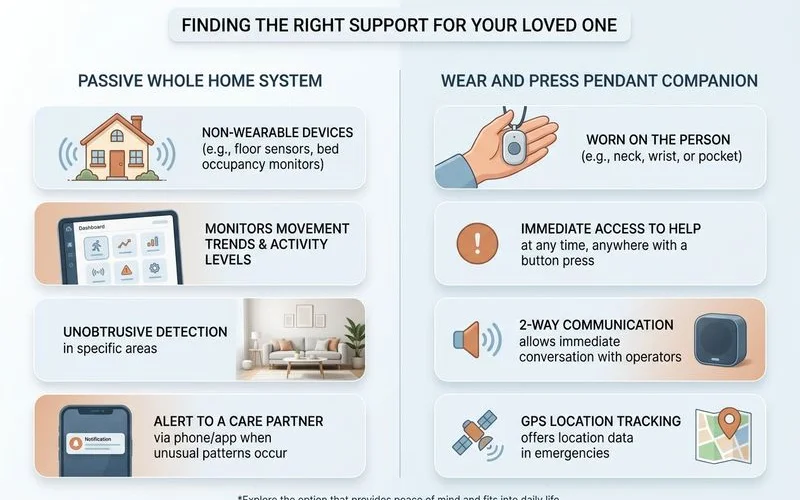
Cost is another major dividing line in Canada. Standard wear-and-press devices from providers like Life Assure or Lifeline Canada typically run between $25 and $60 CAD per month. Our team always advises families to look beyond just the monthly fee and consider the hidden cost of non-compliance.
| Feature | Medical-Alert Pendant | Passive Camera System |
|---|---|---|
| Action Required | Must be worn and pressed | None (Automatic detection) |
| Coverage Area | Depends on the wearer’s location | Whole-home context |
| Average Canadian Cost | $25 to $60 CAD per month | Varies (Requires active Wi-Fi) |
Where the Pendant Fails (and Where It Works)
The pendant’s failure modes are well-known to families who have used one. It has to be worn, and it often isn’t. Our conversations with Canadian families reveal that devices frequently end up on a charger or tucked in a drawer.
The Compliance and Stigma Barrier
A primary issue is the social friction associated with wearing a medical alarm. Data from the 2026 Senior List report highlights that 32 percent of non-users refuse these devices because they simply do not feel old enough. We understand why this stigma causes parents to reject the very tools meant to protect them.
This rejection means the pendant covers one moment only, which is the physical press.
The Bathroom Blind Spot
Data from Comfort Keepers Canada shows that up to 80 percent of at-home falls happen in the bathroom. Our experience shows that even with waterproof ratings, seniors routinely remove their pendants before showering out of discomfort or fear of false alarms.
There is no whole-home context, no early signal, and nothing to protect a 3 a.m. trip down the hall.
The Ideal Wearable Scenario
Pendants still have a valid place in specific situations. They work best for an active parent who reliably wears the device, isn’t bothered by it, and whose main worry is acute incidents during the day. We consider that to be a very real, but highly specific, niche.
It requires a high level of daily user compliance to be effective.
Where Passive Whole-Home Detection Fits
Passive detection closes the wear-it-and-press-it gap by detecting falls automatically. The system works whether your parent is wearing anything or not, and whether she is conscious or not. Our passive Kinpanion approach ensures the whole home is covered, rather than just a single room.
Removing the Human Error
The privacy-first design means there is no live feed, no watched camera, and no surveillance trade-off. Advanced systems like Kinpanion or Bedford’s Radar Shield rely on continuous monitoring technology rather than a person remembering to press a button. We know this provides immense relief to families dealing with cognitive decline or stubborn parents.
For families whose parent simply won’t wear anything, the non-wearable fall alert vs wearable guide goes deeper on the rejection scenario.
Realities of Infrastructure Dependency
There are honest trade-offs to consider with a passive setup. It requires active home Wi-Fi, operates on a monthly rather than upfront model, and does not work during a full network outage. Our concierge setup process covers all of this so families do not get surprised by telecom interruptions.
The pricing page shows the all-in monthly numbers clearly.
Which Should You Pick?
If your parent reliably wears a pendant and your worry is acute daytime incidents, a pendant is the cheapest path. A passive whole-home detection setup is the only category that fits if your parent refuses to wear anything or won’t accept a watched camera. We want to offer a few quick frames to make this decision easier.
Making the Right Choice
Consider these profiles when evaluating your options:
- The Active Go-Getter: A mobile GPS pendant is ideal for seniors who leave the house daily and do not mind wearing a device.
- The Reluctant Parent: Passive detection is required for someone who views wearables as a sign of lost independence.
- The Privacy-Conscious: Both standard pendants and local-processing cameras protect privacy, but passive systems do so without the wearer feeling monitored.
- The High-Risk Bathroom User: Passive sensors are critical for detecting the frequent slips that occur when pendants are taken off for bathing.
If you find yourself in the middle, start your 7-day free trial to try the passive system without committing to a year.
The honest summary is that pendants help when worn and pressed. Our passive detection helps even when she cannot or will not press a button.
That is the entire comparison in a nutshell.