
Many families in Canada face the constant, quiet worry of a parent falling while home alone. With over 8 million unpaid caregivers nationwide in 2026, balancing daily life with this lingering concern is a reality most people understand.
Knowing exactly what happens when fall detected at home notifications arrive completely changes the dynamic of senior care.
Our professional service team regularly sees how a clear, predictable plan replaces anxiety with confidence. So, let us look at the data, what it actually means, and walk through the exact fall detection alert flow.
The Moment of Detection: What You See
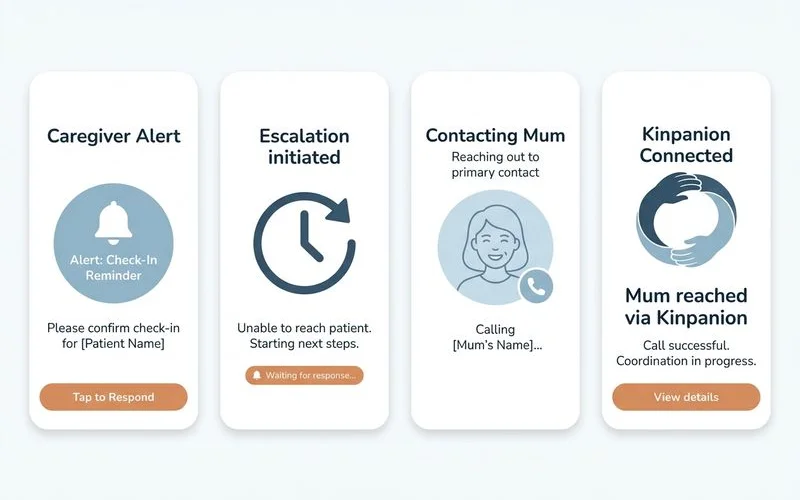
When a fall is registered, your smartphone immediately receives a push notification stating a possible fall occurred. A fall voice escalation call follows right after, ensuring you never miss the alert if your phone is on silent.
We designed this alert flow for calm, decisive action rather than panic. The notification gets your attention, and the app provides the context you need to act.
The application opens to show a privacy-safe stick figure rendering of the incident. This rendering details the approximate position and posture of the person, alongside a short text description.
| System Feature | Traditional Fall Monitors | Our Modern Approach |
|---|---|---|
| Alert Method | Loud base station siren | Silent push notification |
| Incident Verification | Intrusive live video feed | Privacy-safe stick figure |
| Detection Tech | Basic physical buttons | AI-powered room sensors |
You will not see a live video feed of the room at any point. We utilize advanced AI-powered multimodal sensors instead of basic cameras to interpret the movement. This setup respects privacy while giving you the exact context required to make a smart decision.
Many families ask if detection still works during a medical emergency. will it alert if she can’t reach a button? covers that directly. The system automatically triggers the alert without any physical button press.
What You Do Next
The application immediately presents three clear choices: Call your parent, Dismiss the alert, or Escalate the situation to a secondary contact. You can also tap the screen to view the stick figure rendering again for more specific details about the fall posture.
If your parent answers the phone and is perfectly fine, dismissing the alert closes the loop. A genuine emergency requires a much faster approach.
You might need to dispatch emergency medical services or drive over immediately. In Canadian provinces like Ontario, the target EMS response time for severe emergencies is eight minutes, making every single second count.
Setting Up Your Escalation Rules
We highly recommend configuring custom escalation rules during your initial concierge setup. If your parent does not answer within a tuned time window, the software automatically routes the notification to your chosen backups. Many local families configure a parallel-track call so two people reach out simultaneously.
This shared responsibility model is incredibly helpful for busy Canadian caregivers. Recent 2026 data highlights that millions of family members provide 15 or more hours of unpaid care per week. Distributing these notifications prevents one person from carrying the entire monitoring burden.
Consider adding these trusted individuals to your emergency contact list:
- Local siblings or adult children.
- Next-door neighbours who are home during the day.
- Building managers in senior apartment complexes.
- Professional home healthcare aides.
You can explore the wider system architecture on the privacy-first fall detection main page. The core design keeps the primary focus on providing immediate help.
Alert Tuning Keeps the Day-to-Day Calm
Alert tuning actively filters out normal daily movements to ensure only genuine fall events trigger a notification. We tune the detection algorithms to favor a calm environment over constant noise.
The biggest risk with any health monitoring system is alert fatigue. Too many false positives eventually condition families to ignore or dismiss real emergencies. Some older wearable devices have notoriously high error rates, with historical pilot studies showing up to 83 false alarms for every single actual fall.
We designed our current system to avoid that exact scenario. The deliberate trade-off is preferring to miss a minor stumble that was not actually serious, rather than waking you up for nothing twice a week. Most weeks the entire network remains completely silent.
Managing Occasional False Positives
False positives still happen occasionally in every active home. A dropped pillow, a heavy stretch, or a parent sliding down the couch to sleep can sometimes trigger the sensors. Dismissing these minor events calmly helps the software learn the normal movement patterns of the room.
Common daily movements that might trigger early learning alerts:
- Dropping heavy blankets onto the living room floor.
- Sliding down a couch cushion to take a quick nap.
- Performing unusual stretches or floor exercises.
- Large pets jumping off nearby tall furniture.
We actively adjust the home sensitivity settings during the concierge setup if early false positives are higher than expected. The honest summary is quite simple. Alerts arrive precisely when they should, your family decides what to do calmly, and the day-to-day routine stays uneventful.
That calm operational state is exactly the baseline we are after.
Conclusion: What Happens When a Fall is Detected at Home
Understanding what happens when fall detected at home alerts trigger brings profound peace of mind to the whole family.
You no longer have to guess or constantly worry about an unanswered phone call.
We encourage you to review your emergency contact list today to ensure your backup plan is ready. Speak with our concierge team to test your fall detection alert flow and guarantee everyone knows exactly what to do.